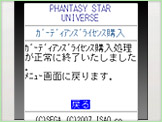
PHANTASY STAR UNIVERSE Ambition of the Illuminus Online Manual
PHANTASY STAR UNIVERSE Online ManualBasics
Guardians License Purchase (Windows PC)
To play the Network Mode of "PHANTASY STAR UNIVERSE Ambition of the Illuminus" on the "Premium Course", you need a Guardians License. Once the free period from an Illuminus Game Key or similar ends, purchase a Guardians License.
- Illuminus Game Keys and Game Keys each come with a free period. Note that if you purchase a "Guardians License automatic renewal" during the free period, the remaining free period is lost.
- When playing Network Mode at a SEGA-authorized internet café, you are on the Premium Course even without registering an Illuminus Game Key or purchasing a Guardians License.
Guardians License purchase steps
Follow the steps below to purchase a Guardians License.
Purchasing a Guardians License on a PC
- STEP1
-
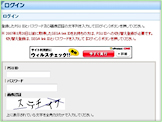
Log in with your PSU ID.
Open the PSU ID management page in Internet Explorer 6.0 or later. Once the management page is open, press the "Log in" button to go to the login page, then enter your PSU ID and password.
- STEP2
-
Purchase a Guardians License.
Press the "Purchase Guardians License" button and choose your payment method.
Automatic renewal is paid by "Credit card"; 30-day passes by "NET CASH", "WebMoney", "Edy" or "Mobile Edy"; and usage codes are available as a "30-day usage code" or "90-day usage code".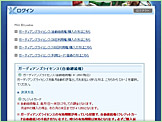
- STEP3
-
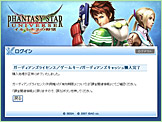
Guardians License purchase complete!
Your Guardians License purchase is now complete.
Purchasing a Guardians License with a mobile phone
- STEP1
-
Open the mobile billing and registration site.
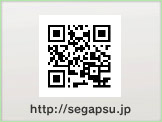
On a mobile phone (Docomo / au / SoftBank) that can connect to the internet with SSL, scan the QR code (left) or enter the URL (http://segapsu.jp) directly to open the PSU ID management page.
- The PSU ID management page also carries the latest news.
- STEP2
-
Log in with your PSU ID.
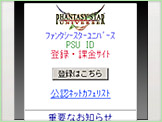
Check the list of supported models at the bottom of the billing and registration site, then click the "Register here" button to open the PSU ID login page. From there, go to the new registration page via "New registration" at the bottom of the page.
- STEP3
-
Purchase a Guardians License.
Press the "Purchase Guardians License" button and choose your payment method.
Automatic renewal is paid by "Credit card"; 30-day passes by "NET CASH", "WebMoney", "Edy" or "Mobile Edy"; and usage codes are available as a "30-day usage code" or "90-day usage code".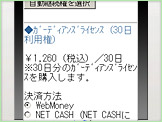
- STEP4
-
Guardians License purchase complete!
Your Guardians License purchase is now complete.