PHANTASY STAR UNIVERSE Ambition of the Illuminus Online Manual
PHANTASY STAR UNIVERSE Online ManualBattle / Items
First-Person Camera / Goggles
First-person camera
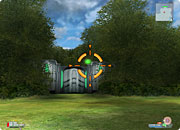
The "first-person camera" lets you aim at high places and make more precise ranged attacks. Press [Q] in a city or field to switch to the first-person camera. Note that you cannot move while using it.
- Some ranged weapons (machineguns, shotguns, etc.) cannot attack from the first-person camera.
Goggles

"Goggles" are equipment that let you find things you normally cannot sense, such as destructible objects. Once you have found an object, you can see it afterward without using the goggles.
- In Network Mode, you can get goggles by playing certain missions, such as story missions.
How to wear them
There are two ways to wear the goggles.
- Switch to the first-person camera with [Q], then press [←] [↑] to turn the goggles ON/OFF.
- Select the goggles from "Belongings" in the Main Menu and set them on the Action Palette with "Swap palette". Then select the goggles on the Action Palette to switch to the goggles view.