PHANTASY STAR UNIVERSE Ambition of the Illuminus Online Manual
PHANTASY STAR UNIVERSE Online ManualLobby Actions
"Lobby actions" let your character perform special motions.
How to perform lobby actions
- STEP1
-
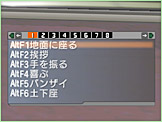
Open the lobby action menu.
Press [↓] in a lobby to show the lobby action menu at the bottom right of the screen.
Choose an item with [↑] [↓] [←] [→].
- STEP2
-
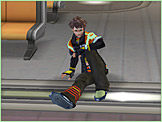
Perform the lobby action.
Press [Enter] to confirm and perform the lobby action.
Lobby action shortcuts
Press [Alt] + [F1]–[F12], [Alt] + [1]–[0] or [Alt] + [A]–[Z] to perform the matching action. Each action matches the number shown in the lobby action menu.
- Confirm with button 7, or while holding [Shift], to perform the opposite gender's lobby action.
- In the field, you can perform the lobby actions on [Alt] + [F1]–[F12] when you are not holding a weapon.
Lobby action chat commands
Lobby actions can also be performed with chat commands.
See below for how to enter them.