PHANTASY STAR UNIVERSE Ambition of the Illuminus Online Manual
PHANTASY STAR UNIVERSE Online ManualGC (Guardians Cash)
How to Purchase
Guardians Cash (hereafter GC) can be purchased by visiting the PSU ID management page from the official Phantasy Star Universe (hereafter PSU) website.
As with the Guardians License, you can pay by "Credit card", "NET CASH", "WebMoney", "Edy" or "Mobile Edy".
Purchasing GC
- STEP1
-
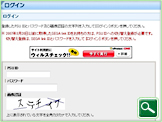
Log in with your PSU ID.
Open the PSU ID management page in Internet Explorer 6.0 or later and enter your PSU ID and password.
- STEP2
-
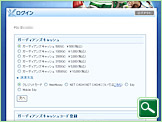
Purchase GC.
Press the "Purchase Guardians Cash" button and choose your payment method. You can choose from "Credit card", "NET CASH", "WebMoney", "Edy" and "Mobile Edy".
- You can choose how to pay for GC regardless of how you pay for your Guardians License.
- You can also change the payment method each time you pay for GC.
- STEP3
-
GC purchase complete
Your GC purchase is now complete.
If you are logged in to the game, log out once and log in again.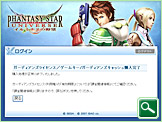


How to check your GC balance and usage history
Checking your GC balance
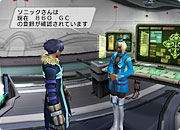
Whenever you can open the Main Menu, you can check it under "Status".
In GC missions you can also check it by selecting "Check current GC" in the NPC menu at "Supervision Room: Main Terminal (just before the trial starts)".
Checking your GC usage history

Talk to the NPC "Horloop Dens" in the Guardians HQ Supervision Room and select "View GC usage history".
In GC missions you can also check it by selecting "View GC usage history" in the NPC menu at "Supervision Room: Main Terminal (just before the trial starts)".
Notes on purchasing GC
Please be sure to read this before paying.
- Be sure to read and agree to the server terms of use before using this service.
- If you are a minor, be sure to get the consent of your legal guardian (parent, guardian, etc.) before using this service.
- GC is shared by every character on your account, including characters on other entrances of the same PSU ID.
- Purchased GC does not expire.
- GC cannot be purchased on the "PSU billing mobile site".
- Purchased GC cannot be moved to another PSU ID or transferred to anyone else.
- GC cannot be refunded for any reason once payment is complete. Please also note that after using optional services, you cannot exchange them for cash or receive any other refund for any reason.
- Many of the GC missions offered have character level limits, so you may not be able to accept them.
Check the limits on the "price list page". - If you buy GC while logged in to the game, it is not reflected in the game until you log out and log in again.
- For questions and inquiries about GC, please use the "support page".
- Out of consideration for minors, purchases are limited per month as follows, based on your age at the time of purchase.
- Under 13: up to ¥5,000
- 13 to 19: up to ¥20,000
- 20 and over: no purchase limit