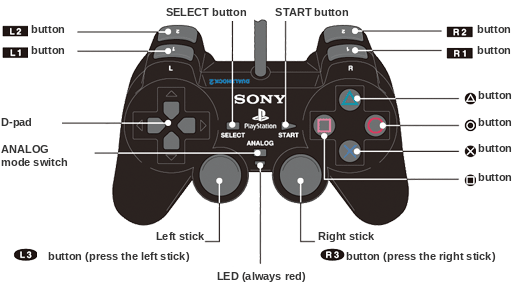
A list of the basic controls for the analog controller (DUALSHOCK 2) and a USB keyboard for PlayStation 2.
Analog controller (DUALSHOCK 2)
Movement controls
| Left stick |
Move character |
| Right stick |
Control follow camera |
| Directional buttons ↑↓ |
Select who to follow |
| Directional button ← |
Toggle auto-run ON/OFF |
| ○ button |
Talk to characters, examine, pick up items, show Lock-on Menu |
| △ button |
Auto-run & follow OFF |
| □ button |
Show lobby action menu, auto-run & follow OFF |
| L1 button |
Reset view to the front, step while held and moving, (hold) auto-run & follow OFF |
| L3 button |
Switch character info display |
| R3 button |
Switch between follow camera / first-person camera |
Combat controls
| × button |
Open Action Palette |
| △ button |
Skills (striking weapons), technics (technic weapons) |
| □ button |
Normal attack (striking / ranged), bullets (ranged weapons), technics (technic) |
| L1 button |
Lock onto enemies, switch goggles view in first-person camera |
| R1 button |
Switch one-handed weapons, switch technics on technic weapons, switch goggles view in first-person camera |
Menu controls
| Directional buttons |
Move cursor, turn pages |
| START button |
Skip movie, show / hide Main Menu |
| SELECT button |
Show / hide software keyboard |
| ○ button |
Confirm |
| × button |
Cancel |
| L1 button |
Switch window pages, switch between menu shortcuts / chat shortcuts (while entering) |
| L2 button |
Shortcut to the notification icon |
| R2 button |
Switch chat method / chat log display, switch window pages |
Character creation controls
| Directional buttons |
Move cursor, select parts |
| Left stick |
(Where the color picker is available) Operate color picker |
| Right stick |
Zoom and rotate character |
| ○ button |
Confirm |
| × button |
Cancel |
| △ button |
(When choosing a voice) Play voice |
USB keyboard for PlayStation 2
The USB keyboard for PlayStation 2 is used for chat. The character is mainly controlled with the analog controller (DUALSHOCK 2).
Common
| [F1] |
Show / hide Main Menu |
| [F2] |
Show / hide Main Menu "Belongings" |
| [F3] |
Show / hide Main Menu "Map" |
| [F4] |
Show / hide "Party" under Community in the Main Menu |
| [F5] |
Show / hide "Simple mail" under Community in the Main Menu |
| [F6] |
Show / hide "Partner cards" under Community in the Main Menu |
| [F7] |
Show / hide "Shortcut settings" under Community in the Main Menu |
| [F8] |
Show / hide public chat log |
| [F9] |
Show / hide party chat log |
| [F12] |
Switch chat method / chat log display |
| [Enter] |
Skip movie, confirm chat input |
| [Tab] + [Enter] |
(Press when confirming after entering chat) Show cut-in |
| [←] [→] |
Choose expression while a cut-in is shown (press Enter to confirm) |
| [↑] [↓] |
Choose camera position while a cut-in is shown (press Enter to confirm) |
| [Shift] + [Enter] |
(Press when confirming after entering chat) Show exclamation speech bubble |
| [Ctrl] + [Enter] |
(Press when confirming after entering chat) Show cloud speech bubble |
| [Scroll Lock] |
Switch between menu shortcuts / chat shortcuts |
| [Shift] |
Switch between menu shortcuts / chat shortcuts (while entering) |
Menu controls
| [↑] [↓] [←] [→] |
Move cursor |
| [Home] |
Show / hide Main Menu |
| [Esc] |
Hide Main Menu |
| [Enter] |
Confirm |
| [Back Space] |
Cancel |
| [M] |
Show / hide list sort options |
Chat
See below for chat controls.