PHANTASY STAR UNIVERSE Ambition of the Illuminus Online Manual
PHANTASY STAR UNIVERSE Online ManualMy Room
My Shop

In My Room you can open a shop to sell items you have obtained. Talk to the Partner Machine, choose the "Shop Open" Remodel Ticket from "Remodel", and open your shop.
- You can still use other My Room features while your shop is open.
To shop at another player's My Shop, see below.
Editing your shop
Accessing the shop counter lets you set up items for sale and your advertisement text.
- STEP1
-
Access the shop counter.
This explains how to sell items. Access the shop counter in My Room, and the shop editing menu is shown.

- STEP2
-
Select "Change products".
Select "Change products" from the My Shop menu.

- STEP3
-
Select "Storage items".
Select "Storage items" from the product change menu.

- Selecting "Items on sale" in the menu lets you change the price of items on sale or return them to storage. For consumables you can also restock the quantity on sale.
- STEP4
-
Select the item to sell.
The items in storage are shown. Select the item you want to sell.

- STEP5
-
Set the selling price.
Selecting an item shows the price setting screen. Set the price you want to sell it for.

- STEP6
-
The item goes on sale.
Once you set a price, you can start selling that item in My Shop.
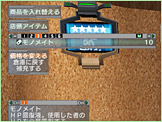
- Up to 32 items can be put on sale in the shop.
Writing ad text

Select "Write ad text" from the shop editing menu to create ad text for your shop. Other players' shop searches look through this text.
About Meseta from My Shop sales
When an item sells in My Shop, the Meseta from the sale is deposited in the Partner Machine's storage.
- The Partner Machine's storage can hold up to "99,999,999" Meseta. Note that if My Shop sales would take it over the limit, you cannot receive the excess.