PHANTASY STAR UNIVERSE Ambition of the Illuminus Online Manual
PHANTASY STAR UNIVERSE Online ManualMy Room
Titles
"Titles" are records you earn through various actions in the game, such as clearing a certain number of missions. Title features are used from the Visiphone in My Room.
When you earn a title, you can also receive items as a reward.
If you are connected on the Free Course, you cannot enter My Room, so you cannot use the title features. However, your actions while on the Free Course still count toward your player records.
Titles are tallied per entrance, and title rewards are also received per entrance.
Player records

"Player records" shows records such as monsters defeated and missions cleared.
"Player records" are not per character; for each entrance, the total across characters, or the highest value, is recorded.
- Player records cannot be reset.
- The content and tallying method differ from the "personal data" you can view on PSU Mobile.
- Records other than "Story mission completion", "Total play time" and "Longest login streak" are tallied from February 25, 2010 onward.
Title records

"Title records" shows the titles you have earned.
Where a title name is shown as "?????", you can check the conditions for earning that title. The title name is shown once you meet the conditions and earn it.
Receive title rewards
"Receive title rewards" lets you receive items as a reward for each title you have earned.
You can receive items related to the title and more.
- STEP1
-
Check the Visiphone.
When you meet the conditions for a title, a large "!" mark is shown on the Visiphone.

- STEP2
-
Select "Receive title rewards".
If there are titles you have not yet checked, "Receive title rewards" is shown in orange.
Access the Visiphone and select "Receive title rewards".

- STEP3
-
Check the titles you have earned.
Select the title you want to receive a reward for.

- STEP4
-
Receive the title reward.
You get the reward item for the selected title.
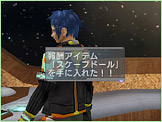
- If the reward items do not fit in your inventory, you cannot receive them. Free up inventory space, then run "Receive title rewards" again to receive them.
Notes
- "Play time" is updated each time you access the Visiphone. It shows the total across characters for each entrance.
- "My Room visitors" counts that character each time they enter your My Room. It shows the total across characters for each entrance.
- "Missions completed" does not include story missions, side story missions or missions without a trial.
- The player record "Current login streak" increases even if the date changes while you stay logged in.
However, it increases when the server finishes tallying, so if you log out right after midnight the tally may not finish and it may not increase.
If you are logging out right after the date changes, first check on the Visiphone in My Room that today has been added to "Current login streak" in "Player records". - To increase the player record "Current login streak", after selecting a character you need to continue until you can control them in a lobby or similar. Connections on PSU Mobile are not counted.
- The player record "Current login streak" shows your ongoing streak, and "Longest login streak" shows your longest streak since April 22, 2010.