PHANTASY STAR UNIVERSE Ambition of the Illuminus Online Manual
PHANTASY STAR UNIVERSE Online ManualMy Room
Other Players' My Rooms

From the "Visiphone" in My Room you can visit other players' My Rooms. In the room you visit, you can post on the bulletin board and place Room Goods.
If the shop is open, you can also buy items.
How to visit a room

You can visit another player's My Room by selecting "Go to a room" or "Find a shop" on the Visiphone.
Visiphone menu (when visiting)

In another player's My Room, some of the Visiphone menu differs from your own room.
Return to my room
Returns you to your own My Room.
Bulletin board
Posts a message on the bulletin board. Works the same as in your own room.
Go to a room
Takes you to another player's My Room. Works the same as in your own room.
Find a shop
Searches for other players' shops. Works the same as in your own room.
Back
Closes the Visiphone menu.
Partner Machine menu (when visiting)

In another player's My Room, some of the Partner Machine menu differs from your own room.
Shop
Buys items in the My Shop.
Use storage
If the My Room you are visiting belongs to a character on the account you are logged in with, "Use storage" is shown instead of "Shop", and you can use that character's storage.
- This also works for characters on other entrances.
View synthesis entries
Shows the boards the room's owner has entered.
View status
Shows the Partner Machine's status.
Room Goods Management
Place Room Goods.
How to place Room Goods (when visiting)
- STEP1
-
Talk to the Partner Machine.
Talk to the Partner Machine, and the Partner Machine menu is shown.

- STEP2
-
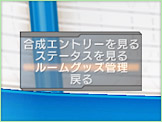
Select "Room Goods management".
Select "Room Goods management" from the Partner Machine menu.
- STEP3
-
Select "Placement mode on".
Select "Placement mode on". The spots in My Room where Room Goods can be placed are shown with red frames.

- STEP4
-
Choose where to place it.
Move onto or near a red frame and it glows blue. Press [Enter] there to show the placement confirmation screen.

- STEP5
-
The placement confirmation screen is shown.
Select "Yes" on the confirmation screen to see a list of Room Goods you can place.

- Note that once you place Room Goods in another player's My Room, you can no longer remove them.
- STEP6
-
Place Room Goods.
Select Room Goods from the list to place them there.

- STEP7
-
Select "Placement mode off" to finish placing.
After placing, select "Placement mode off" from "Room Goods management" again to finish placing Room Goods.

How to shop at a My Shop
If the room you are visiting has an open shop, you can buy the items on sale.
- STEP1
-
Talk to the Partner Machine.
Talk to the Partner Machine, and the Partner Machine menu is shown.

- STEP2
-
Select "Shop".
Select "Shop" from the Partner Machine menu.

- STEP3
-
Select the item to buy.
The items on sale and their prices are shown. Select the item you want to buy.

- STEP4
-
Buy the item.
Meseta is spent and the item you bought is added to your inventory.
