PHANTASY STAR UNIVERSE Ambition of the Illuminus Online Manual
PHANTASY STAR UNIVERSE Online ManualMy Room
Partner Machine

The "Partner Machine" is your character's companion; one is provided for each My Room. First, give it a name. Once you have entered it, various features become available.
Partner Machine menu
Use storage

You can deposit items, Meseta and more from your inventory for safekeeping. You can also withdraw deposited items and Meseta, and lock them.
- Storage holds up to 300 items, but it can be expanded to up to 500 using the dedicated item "Nanotransformer EX".
- After expanding to 500 with the "Nanotransformer EX", you can expand it further to up to 1000 using the "Nanotransformer GC".
- The "Nanotransformer EX" can be bought at the Room Goods shop on Guardians Colony, Clyez City 2F.
- The "Nanotransformer GC" can be bought in the "GC Shop", accepted in the Guardians HQ Supervision Room in the Guardians Colony.
- Buying the "Nanotransformer GC" requires Guardians Cash.
- Note that if you expand storage and then create a new character in the same slot, overwriting the character, the expanded storage is reset and its limit goes back to 300.
Talk (PM functions)

You can take tutorials on My Room and on missions.
- The mission tutorial is the same as the one you can play on Guardians Colony, Clyez City 1F.
Give item (PM functions)
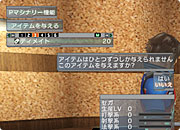
Giving items changes the Partner Machine's stats. There are four stats, "Striking", "Ranged", "Technic" and "Armor", and each item you give raises or lowers them. The total of the four is shown as its "production LV". The higher the production LV, the higher the success rate of synthesis. Giving a "Nanotransformer EX" or "Nanotransformer GC" does not raise stats but expands storage instead.
- The maximum total is 100. For example, if Striking is at LV80, the other three must total LV20 or less.
Synthesize items (PM functions)
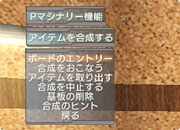
You can synthesize items using the "boards" and "materials" you have obtained.
View status (PM functions)
Shows the Partner Machine's status. Once the Partner Machine's partner card has been added, you can also see its personality, weapons, combat values and more, in addition to the stats below.
Production LV
Shows the total of the following four stats.
Striking
The higher this value, the better it is at synthesizing striking weapons.
Ranged
The higher this value, the better it is at synthesizing ranged weapons.
Technic
The higher this value, the better it is at synthesizing technic weapons.
Armor
The higher this value, the better it is at synthesizing armor.
Rename (PM functions)
Changes the Partner Machine's name.
Back (PM functions)
Cancels the Partner Machine functions.
Remodel

After buying a Room Goods "Remodel Ticket" at a shop or elsewhere, you can remodel My Room with this item.
- Some Remodel Tickets let you move My Room from the Guardians Colony to another planet.
Customer service

Only available when your shop is open in My Room. Sets the messages shown when other players visit your shop or buy items.
Room Goods Management

Places and manages Room Goods in My Room.
Jukebox
Changes the BGM in My Room. You set the BGM from the "BGM list". To add BGM to the list, you need "DISC" items.
Selecting "Add BGM" while you have a DISC in your inventory shows a list of DISCs you can add. Select a DISC to add its BGM to the list.
Cancel
Cancels the Partner Machine menu.
Partner Machine evolution

The Partner Machine evolves into new forms depending on its production LV and each stat's value. When it evolves to the 4th stage, the Partner Machine's partner card is added, and you can add the Partner Machine to your party and take it on missions.
- Using the dedicated item "PM Device ZERO" resets the Partner Machine. However, you then cannot add it to your party again until it evolves to the 4th stage once more.
- "PM Device ZERO" can be bought at the Room Goods shop on Guardians Colony, Clyez City 2F.